MyAutoBio
Your autobiography, without sitting down to write it.
Built for people who want to write their life down. It started as an app that would write your diary for you, and I rebuilt it to help you write it yourself. It shipped to the App Store.



 +1







2nd
One design before mine, on an off-the-shelf kit
1→3
One thing to write, and three ways to read it back
iOS
Shipped to the App Store, then wound down
Overview
A journaling app that ends in a printed book.
MyAutoBio is an app for writing your life down. It had been designed once before I joined, on an off-the-shelf component kit. I came on as the only designer and rebuilt it on its own design system. I built the figures here in code, with help from AI. The demos run as real interfaces, played on scroll.
The app asks one question at a time, and the answers become a journal, a timeline by year, and a printed book.
The shape of the work
Before
Built on a stock kit
An off-the-shelf kit, and the designs drifted off it
Mine
Rebuilt on its own system
Components built for the product, then the screens
Problem
The founder wrote his father's eulogy and realised how little he knew.
MyAutoBio’s founder had a father who lived ninety-six years, and most of it went unrecorded. He built the app so people could record their own life as they lived it.
my story.docx
What we learned
We talked to people and studied the other apps first.
Everyone we talked to already wanted to journal.
We found them in subreddits, Facebook groups and forums, our waitlist, and among people already using the product. Most were around forty. Three things came up again and again: they were too busy to write every day, typing took too long, and they didn’t know what to write about.
What we heard
“I don’t know what to write about.”
The app hands you a question to answer.
“Typing takes too long.”
Answer out loud instead.
“I’m too busy to write every day.”
A few rough lines is enough to save an entry.
Older users wanted the printed book most.
A hardcover comes with the subscription.
The other apps had the pieces separately.
Among the apps already out there, prompts and printed books were everywhere. Timelines existed, but in different products, and nothing combined the three. None of them made a single entry easier to write, so that is where the effort went, and what the AI was for.
| Features | oursMyAutoBio | My Life In A Book | StoryWorth |
|---|---|---|---|
| Risk Free Trial | Yes30-day free trial | No | No |
| Guided Journaling | Yes | Yes | Yes |
| Weekly Prompt Email | Yes | Yes | Yes |
| Freewrite | Yes | Yes | Yes |
| Speech-to-text Reflections | Yes | Yes | No |
| Preview Book: Download PDF | Yes | No | Yes |
| Chronological Life Timeline | Yes | No | No |
| World Events | Yes | No | No |
| AI Writer | Yes | No | No |
| Relationship Advisor | Yes | No | No |
| Gift Idea Generator | Yes | No | No |
| Price (Book Included) | $79/yearor $5/month | $79/year | $99/year |
The three views
Your entries become a journal, a timeline, and a book.
The journal starts you with a question.
In the version I inherited, writing was three pages you walked through in order, and nothing at the end brought you back to write again. Your own entries were buried in a menu under your profile picture.
Now it is one screen with three tabs: a question the AI recommends, the questions sorted into chapters like childhood and work, or a freewrite. You can dictate an answer instead of typing it.
Where you wrote
A one-way path, and one page you can move around.


The timeline anchors entries to real world events.
An entry lands on the timeline by its date. Beside it you can show world events from that year, like sports or science news, to jog your memory of what else was happening. You pick which kinds show up, or leave them off.

MyBook prints your journal as a hardcover.
The subscription includes one printed hardcover. Because printing is final, the book is made in three steps: designing the cover, reviewing the chapters, and generating it. Only the entries you make public reach it.


Foundation
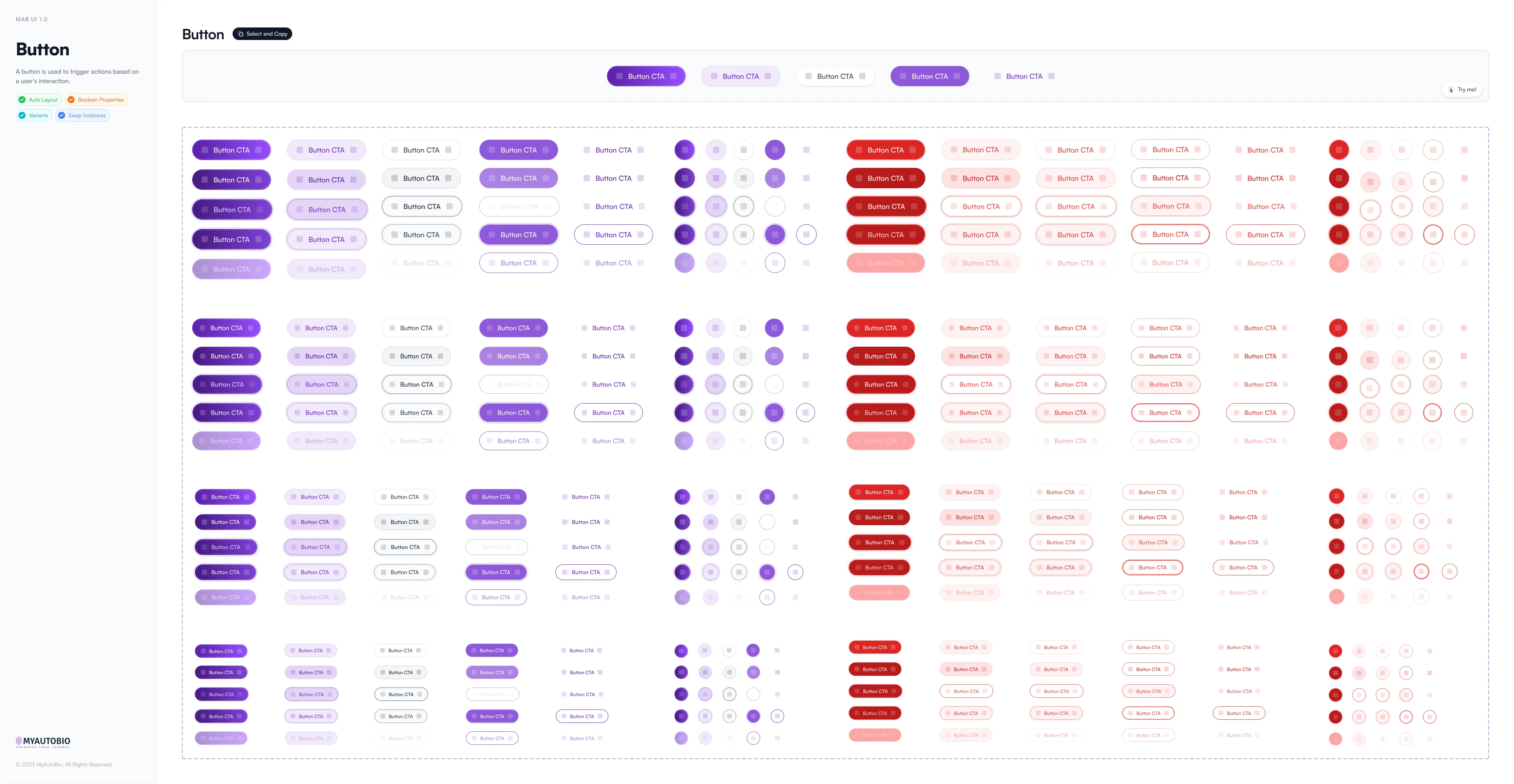
Each screen was designed on its own, not as a system.
The brief was to fix the product, which sat on Ant Design, an enterprise kit that no two screens used the same way. No kit ships a timeline of your life or an editor that rewrites your words, so I built my own 47 components first, those two among them, and drew every screen from them.
The AI
What shipped, what I disagreed with, and what was ready to build.
I made the AI start from what you wrote.
When I joined, MyAutoBio’s AI writer was a form where you described what you wanted and got a whole story back. Most of it was invented, in an app meant to keep real memories. I replaced it with Enhance, a button that rewrites your own rough lines and keeps the rewrite only if you accept it.
When you skipped a question, a popup asked you why, and your answer fed the AI that picks questions. It stopped you in the middle of writing, so I cut it. The AI learns enough from which questions you answer and which you skip.
Who did the writing
Before, the AI wrote your story. Now you write it.
The AI Hub’s tools leaned toward another product.
The AI Hub was how the founder planned to bring his app for fathers into MyAutoBio, with four tools for writing, gift ideas, fun activities and relationship advice. There was some logic to it, but none of them used your journal, so I argued for the AI Clone, which answers from it. The Hub shipped.

I designed an AI that answers from your own journal.
An AI answering questions about your life can make things up, so the AI Clone cites the entries behind every answer. Visitors to your profile can ask it too, and it only uses your public entries. It was ready to build when the product wound down.

Explorations
One thing I cut, one I moved, and one I pushed for.
A home screen of tiles pulled people away from writing.
My first version opened on a home screen with today's question and a grid of tiles below it. Every tile led somewhere the navigation already went, so I cut the screen, and the app now opens straight into writing.


A planner put events on your timeline before they happened.
The team’s Plan page let you set up an activity, a vacation or a goal and add it to your timeline. But the timeline is a record of what already happened, and planning ahead is a different job from writing about your life. I argued it didn’t belong, so its planning moved into the AI Hub’s activity tool, off your timeline.

I pushed for a plainer page and a bigger editor.
The team wanted the question card to draw more focus, and colour was their answer. I tried six of them and none landed, because the card was never what crowded the page. Under it sat a row of shortcuts and one line to write in, so I took the shortcuts off and made the writing area big and plain.
The page · six fills, then the one that shipped
Making the answer the main thing.


Outcome + reflection
It shipped to the App Store, rebuilt on its own system.
MyAutoBio launched on the App Store with the journal, the timeline and MyBook. After launch the team ran user testing and marketing with TikTok creators, and the AI Clone was lined up as a second phase if the testing backed it.
The testing never finished and the Clone was never built. The company wound the product down and took the app off the store. We were tracking usage, but I was off the project before anyone read it, so there are no numbers to show.
What shipped.
Write, timeline, book: a question to answer, a life laid out by year, and a hardcover you can order.
A design system, built first: colour, type and spacing, then every component built from them.
Responsive across three sizes: desktop, tablet, and mobile, screen by screen.
iOS App Store launch: seventeen app icon sizes and mockups for three iPhone sizes.
What slipped
The shipped app never fully matched the designs.
My design system was Figma files with no code behind them, so every component was built again in code. Figma’s Dev Mode for handing designs to developers became generally available after that, and a tool like Zeplin would have helped, but I was too busy designing to question it.
What I learned.
I never agreed how we’d measure success: I built the writing, the timeline and the book without it, so when I left, the usage we tracked couldn’t say whether any of them worked.
The writer decides what the AI keeps: in an app about your own life, Enhance’s rewrite stays only if you accept it, and the Clone shows the entries behind every answer.
Every screen had to lead back to writing: the tile home screen and the planner both pulled people away from writing, so I cut one and moved the other off the timeline.
Credits
The founder owned it, an AI architect led the AI work, and two developers built it as I designed. We made the calls about where it went together.
Next project · 01 / 03